Email Correspondence Generation
The Email Correspondence Generation feature allows creating and sending email messages directly from Task Manager within an ongoing case. It enables effective communication with clients and other process participants while maintaining full correspondence documentation.
Key Features
- Creating email messages from the case view
- Advanced text formatting for messages
- Attaching documents related to the case
- Automatic linking of correspondence to the task
- Tracking the history of sent messages
Email Generation Process
- The user opens the task details.
- Selects the “Generate Email” option from the floating menu.
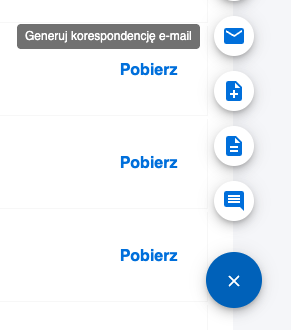
- A modal opens with a form to create the email message.
Message Editor Features
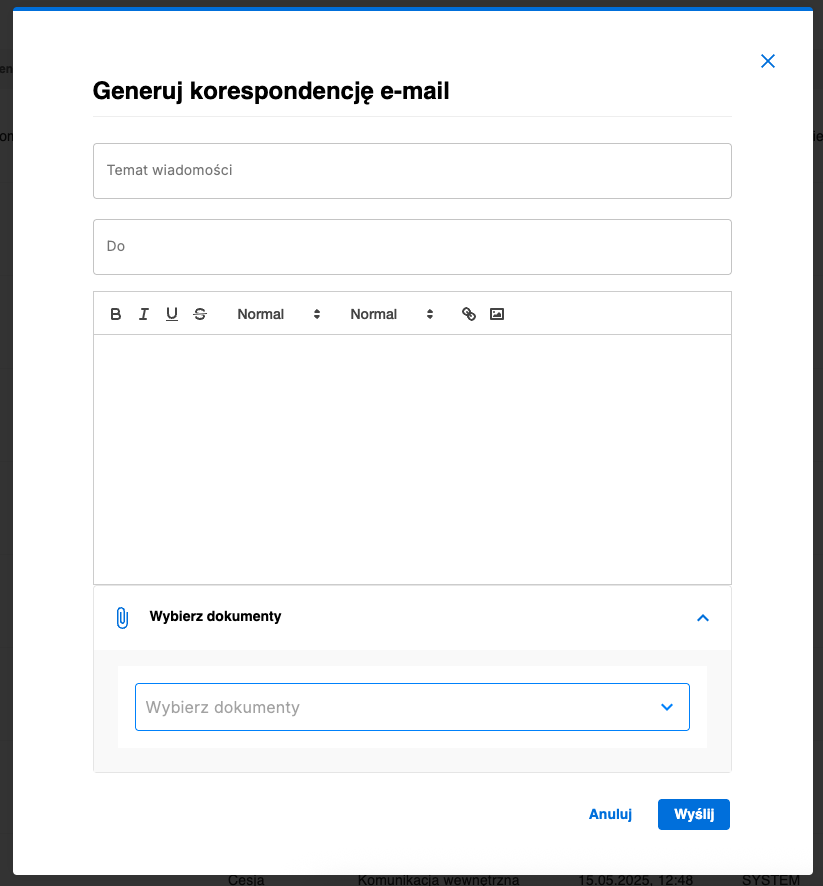
The email creation modal contains the following sections:
Basic Information
- Subject – field to enter the email subject
- Recipients – define who the message will be sent to
Rich Text Editor
Advanced editor enabling:
Text Formatting:
- Bold – highlight important parts
- Italic – add emphasis to text
- Underline – mark key information
- Strikethrough – mark outdated content
Font Settings:
- Small – small font size
- Normal – standard size (default)
- Large – large font size
- Huge – very large font size
Additional Options:
- Headers – structure the message content
- Insert Images – add images to the message
Select Documents
Section enabling:
- Browsing documents assigned to the case
- Selecting documents to attach to the email
- Previewing selected attachments before sending
Effects of Email Generation
- The email is sent to the specified recipients
- A copy of the message is saved in the case history
- Attached documents are automatically included in the email
- Full correspondence documentation is preserved within the task
Automatic Response Processing
Task Manager can be configured to automatically receive and process replies to sent emails. Thanks to integration with the mailbox, all responses from recipients are automatically:
- Fetched from the mailbox – the system monitors incoming messages
- Assigned to the appropriate case – e.g., based on message subject identifiers and metadata
- Added to the communication history – ensuring full correspondence documentation
This feature enables full, two-way communication while maintaining complete documentation integrity in one place.
Automatic response processing configuration depends on the project specifics and requires appropriate process setup and integration with the organization’s mail system.