Changing Task Basket
The task basket change functionality enables users to switch between different groups/teams of tasks depending on current needs and work context.
"Active Basket" Section
Groups/Teams List
The "Active Basket" section contains a list of all groups/teams to which the logged-in user is assigned. The list includes:
- Work teams — thematic groups of employees
- Project teams — groups created for specific projects
- Functional teams — groups according to roles and responsibilities
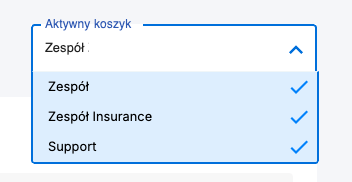
Active basket selection interface with list of available groups/teams
Team Change
The ability to change teams causes:
- Task reload — automatic list refresh
- Task visibility change — display of tasks specific to the selected group
- Work context update — interface adaptation to the selected team
Basket Change Effects
Automatic Reload
After selecting a new basket, the system automatically:
- Loads tasks assigned to the selected group
- Updates available filters and options
- Adapts visible columns to team specifics
- Preserves user preferences for the given basket
Group Context
Each basket/team can have:
- Own processes — specific to the given group activities
- Custom columns — parameters important for the given team
- Dedicated filters — criteria appropriate for the work area
- Specific permissions — access to certain functionalities
Benefits of Basket Switching
- Organization of work by task types and priorities
- Reduction of information overload through task filtering
- Flexibility in work organization according to individual preferences
- Quick context switching without losing progress
- Personalization of interface according to roles and responsibilities