My Tasks
The "My Tasks" tab provides a view of tasks assigned directly to the currently logged-in user. It is a filtered view of the task basket that focuses exclusively on tasks requiring the attention of a specific employee.
Access to My Tasks
Access to the "My Tasks" tab can be obtained through:
- Filter in the header of the task basket - "My Tasks" option
- Direct access from the main Task Manager menu
The task list is automatically filtered to show exclusively:
- Tasks directly assigned to the logged-in user
- Tasks awaiting action from the current employee
- No tasks from other users - even from the same basket/group
Automatic Filtering
Tasks in the "My Tasks" tab are displayed in the same format as in the main task basket:
- Tabular view with configurable columns
- Same filtering options as in the main basket view
- Identical sorting and search functionalities
Functionalities
All options from the task basket
The "My Tasks" tab offers the full set of functionalities available in the main task basket:
View and navigation
- Column configuration - details in Column Visibility Settings
- Advanced filtering - options described in Basket Filtering
- Sorting according to selected criteria
Header options
- All tasks - complete list of tasks assigned to the user
- Consultations - consultation tasks requiring user attention
- Saved filters - custom filters for personal view
Task details - sidebar
Opening details
Similar to the main task basket, clicking on any task record opens a sidebar on the right side:
- Detailed task information
- Status and case data
- Task description and key information
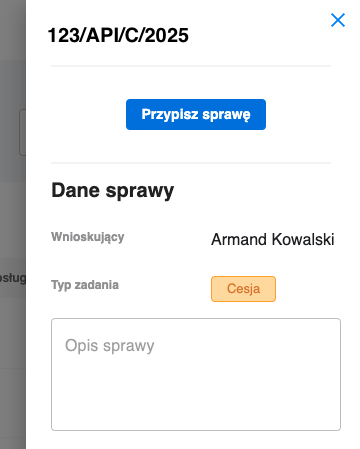
Sidebar with detailed information about the selected task from "My Tasks" list
Action functions
The sidebar offers all standard task management options:
- "Change assignment" - transferring the task to another user
- Status update of the task
- Adding comments and notes
Assignment change modal
After selecting the "Change assignment" option, a standard modal opens with functionalities:
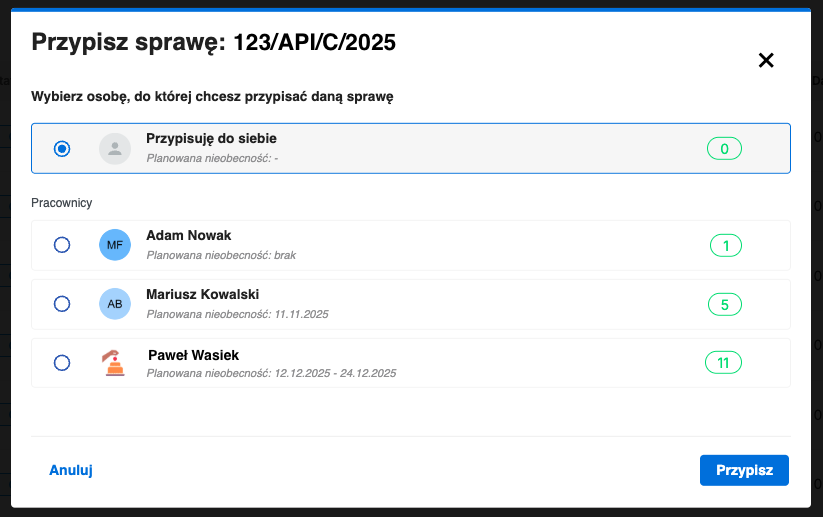
Task assignment change modal with full list of available users
User list
- Complete list of all users in the system
- Information about planned absences of each employee
- Counter of currently handled cases for each user
Task transfer
The modal enables quick and informed task transfer to another user with full context of team availability and workload.
Use the "My Tasks" tab as a starting point for daily work. Thanks to view personalization and saved filters, you can quickly focus on the most urgent tasks.